AVON PORTAL LOGIN / BENEFIT Vs SERVICE DICTIONARY (ATTACHMENTS)
Dear _____________,
We are pleased to inform you that our provider portal is LIVE and ready for use. This means you can now access our portal "TOSHFA" from your digital devices.
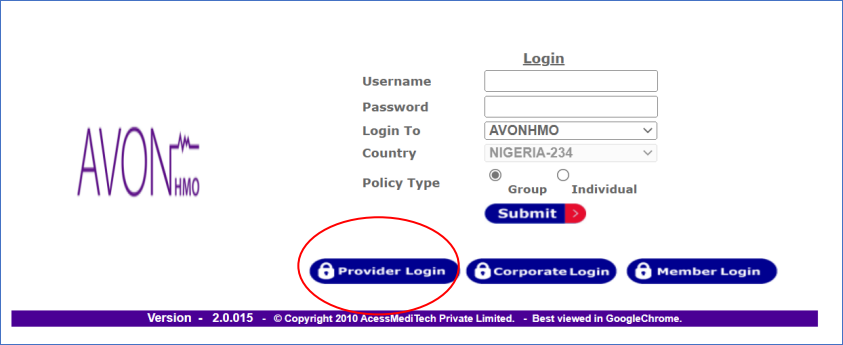
Kindy follow the steps below to login to your profile on TOHSFA.
Your user ID is: *********
If you require further assistance on how to find your way around the portal, we've provided a step-by-step guide on how you can navigate the portal. Just click here.
Thank you for choosing Avon HMO.
Do have a lovely day.
We are pleased to inform you that our provider portal is LIVE and ready for use. This means you can now access our portal "TOSHFA" from your digital devices.
Currently, there are two important things you can check through the portal but we're working on opening up additional modules for you.
Here's what you can check at the moment:
1. Enrollee eligibility i.e. to check if an enrollee is active or not.
2. Hospital list; the monthly enrollee list we used to send to you.Kindy follow the steps below to login to your profile on TOHSFA.
- Call up the URL and select Provider Login http://toshfa.avonhealthcare.com/AVONHMOLive/Index.aspx
- Click on Provider Portal as shown below.
- Log in with Username and Password provided and Submit.
Your user ID is: *********
Your password is: Hospital@1
Following the launch of our Provider Portal where you can access your enrollee list and check member eligibility.
We are opening more modules for you to have Access to.
You can now Request for Pre-Authorization Code from our Portal, Eliminating sending codes via mails or calling for PA codes and reducing general waiting time to ensure you serve our enrollees and your Patients better.
Attached to this mail are,
- Engagement slides showing the process step by step.
- Benefit Vs Service Dictionary: which will be useful in matching services to the benefits.
- Short video further explaining our processes.
If you require further assistance on how to find your way around the portal, we've provided a step-by-step guide on how you can navigate the portal. Just click here.
That's all, and we can't wait to see you get started. If you have any questions or need clarifications, do not hesitate to contact your provider manager,
Thank you for choosing Avon HMO.
Do have a lovely day.
Regards,
Related Articles
AVON PORTAL GUIDE (FOR PA GENERATION AND CLAIMS SUBMISSION)
Dear Provider, Trust your day is going well. Kindly start by using this guide below while your case manager gets in touch with you. Please find your portal login details below: USERNAME: PASSWORD: Hospital@1 Please find below link for your portal use ...PROVIDER PORTAL GUIDE
Dear Provider, Thank you for contacting Avon healthcare. Kindly start by using this guide below while your case manager gets in touch with you. Please find your portal login details below: USERNAME: 2341541 PASSWORD: Hospital@1 Please find below link ...PROVIDER PAYMENT DATA PORTAL UPDATE (office.com)
PROVIDER PAYMENT DATA PORTAL UPDATE (office.com) Please be informed that you are expected to generate your Pa codes for all secondary services, Steps: Input the member number of enrollee and find. Select inpatient or outpatient based on nature of ...CLAIMS SUBMISSION USING PORTAL STEPS FOR ALL SECONDARY CARE SERVICES WITH PA CODE.
Click on claims submission. Select the batch number you want to work on A tab will display showing the summary for the batch. Enter the enrollee’s member number, please note this is not what you are going to input e.g. (AVH/AHL/149067/A), what you ...CLAIMS SUBMISSION USING PORTAL STEPS FOR ALL PRIMARY CARE SERVICES
Generate a batch number for the month you are billing for at claim batch. Go to claims submission. Select the batch number you want to work on A tab will display showing the summary for the batch. Enter the enrollee’s member number, please note this ...